728x90

Authelia 설치 방법
Authelia는 오픈소스 인증/인가 서버로, Docker를 통해 간편하게 설치할 수 있습니다. 주로 홈랩이나 자체 호스팅 환경에서 Nginx/Traefik과 연동되어 2FA, SSO 기능을 제공합니다.
1. 설치 사전 준비 (Docker Compose Prerequisites, 권장)
설치 전 다음 사항이 준비되어야 합니다.
- Docker & Docker Compose: 최신 버전 설치 권장.
- 도메인: auth.example.com과 같은 인증용 서브도메인.
- SSL 인증서: HTTPS가 필수이므로 Let's Encrypt 등을 통해 인증서가 적용된 환경이어야 합니다.
2. 디렉토리 생성:
mkdir authelia && cd authelia
mkdir config
3. Docker Compose 설정 (docker-compose.yml)
안정성을 위해 Redis(세션 관리)와 PostgreSQL(데이터 저장)을 포함한 구성입니다.
version: '3.8'

services:
  authelia:
    image: authelia/authelia:latest
    container_name: authelia
    volumes:
      - ./config:/config
    networks:
      - proxy_network
    environment:
      - TZ=Asia/Seoul
    restart: unless-stopped
    expose:
      - 9091

  redis:
    image: redis:alpine
    container_name: authelia_redis
    networks:
      - proxy_network
    restart: unless-stopped

  db:
    image: postgres:15-alpine
    container_name: authelia_db
    volumes:
      - ./data/postgres:/var/lib/postgresql/data
    environment:
      - POSTGRES_DB=authelia
      - POSTGRES_USER=authelia
      - POSTGRES_PASSWORD=your_strong_password_here
    networks:
      - proxy_network
    restart: unless-stopped

networks:
  proxy_network:
    external: true  # 리버스 프록시와 같은 네트워크 사용 권장
4. 핵심 설정 파일 작성
① 사용자 데이터베이스 (config/users_database.yml)
비밀번호는 반드시 Authelia에서 제공하는 해시 도구로 변환해야 합니다.
users:
  admin:
    displayname: "관리자"
    password: "$argon2id$v=19$m=65536,t=3,p=4$..." # 암호 해시값 입력
    email: admin@example.com
    groups:
      - admin
      - dev
② 메인 설정 (config/configuration.yml)
비밀키(Secret)들은 64자 이상의 랜덤 문자열을 권장합니다.
jwt_secret: "여기에_매우_긴_랜덤_문자열_입력"
default_redirection_url: https://auth.example.com

server:
  host: 0.0.0.0
  port: 9091

authentication_backend:
  file:
    path: /config/users_database.yml

access_control:
  default_policy: deny
  rules:
    - domain: "*.example.com"
      policy: two_factor # 기본적으로 2차 인증 강제

session:
  name: authelia_session
  domain: example.com # 전체 서브도메인 공유
  secret: "세션_용_랜덤_문자열"
  expiration: 3600 # 1시간
  inactivity: 900
  redis:
    host: redis
    port: 6379

storage:
  postgres:
    host: db
    port: 5432
    database: authelia
    username: authelia
    password: your_strong_password_here

notifier:
  filesystem:
    filename: /config/notification.txt # 테스트용 (실 운영시 SMTP 권장)

totp:
  issuer: authelia.com
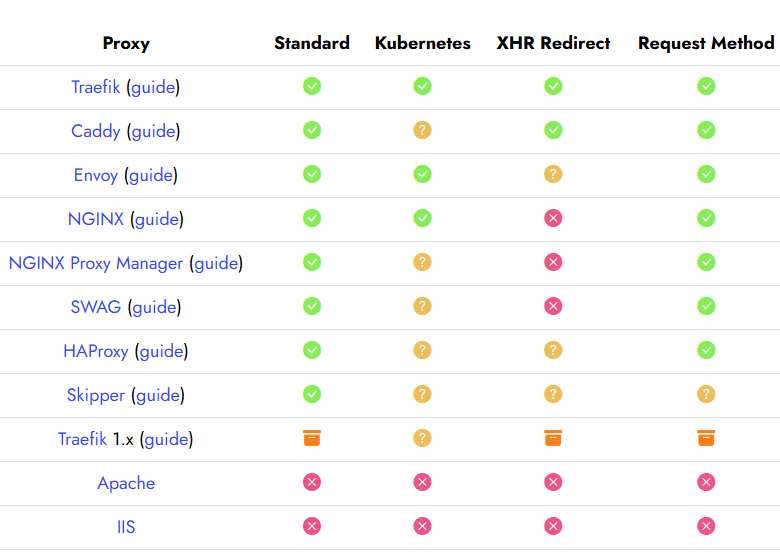
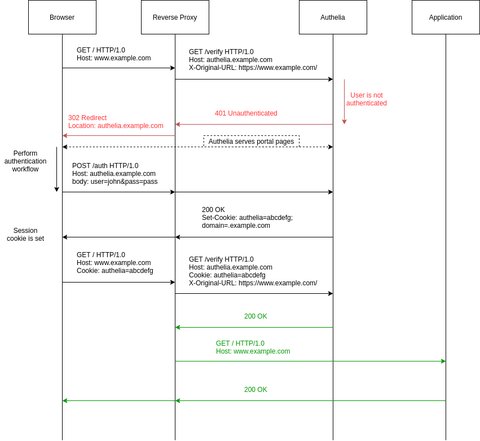
5. 리버스 프록시 연동 (Nginx 예시)
auth.example.com 도메인 설정 파일에 아래 내용을 추가합니다.
# Authelia 인증 경로 설정
location /api/verify {
    proxy_pass http://authelia:9091;
}

# 보호하려는 서비스 설정
location / {
    auth_request /api/verify;

    # 인증되지 않았을 경우 로그인 페이지로 리다이렉트
    error_page 401 =302 https://auth.example.com/?rd=$target_url;

    # 사용자 정보 전달 (헤더)
    auth_request_set $user $upstream_http_remote_user;
    proxy_set_header Remote-User $user;

    proxy_pass http://internal_service:8080;
}
6. 설치 마무리 및 실행
- 컨테이너 실행: docker compose up -d
- 로그 확인: docker logs -f authelia (오류가 없는지 확인)
- 접속: https://auth.example.com에 접속하여 로그인이 정상적으로 작동하는지 테스트합니다.
- 비밀번호 해시 생성: docker run authelia/authelia authelia crypto hash generate argon2 --password 'password' 명령어로 안전하게 생성
- 2FA 수단: TOTP(Google Authenticator) 외에도 WebAuthn(YubiKey, 지문 인식)을 지원하므로 보안 수준을 높일 수 있습니다
주의 사항
- HTTPS 필수: TLS 인증서(Let's Encrypt) 적용.
- 비밀번호 해시: Authelia 웹사이트 Password Hash 도구 사용.
- 포트: 9091 기본, 방화벽 개방.
- 업데이트:
docker compose pull && docker compose up -d. - 공식 문서: https://www.authelia.com/docs (최신 버전 확인).
(주요 자료):
다운로드 링크: Docker 이미지: https://hub.docker.com/r/authelia/authelia (pull 직접),
설정 샘플: https://github.com/authelia/authelia/tree/master/config/templates
728x90
반응형
'InfraPlatform' 카테고리의 다른 글
| Linux sshd 서비스 와 Selunux 방화벽 설정 정리 (0) | 2026.04.14 |
|---|---|
| VMware 환경 Linux 가상머신 NAT(Network Address Translation) 구성 (0) | 2026.04.14 |
| Authelia - 오픈 소스 기반의 강력한 인증 서버 분석 비교 (0) | 2026.04.09 |
| Authelia - 리버스 프록시 환경 강력한 인증(Authentication)과 인가(Authorization) 오픈소스 보안 서버 (0) | 2026.04.09 |
| Hyper-V Host → Rocky Linux 10 SSH 접속 구성 (0) | 2026.04.02 |
| Ollama + LLama + NVIDIA - WSL Oracle Linux 9.5 (0) | 2026.02.13 |
| Windows 11 설치 중 네트워크 드라이버 0x2000022f 오류 해결 (0) | 2026.02.04 |