Microsoft Presidio: Data Protection and De-identification
Presidio(라틴어 praesidium '보호, 수비대'에서 유래)는 민감한 데이터를 적절하게 관리하고 통제하는 데 도움이 됩니다. 다음과 같은 텍스트 및 이미지의 개인 엔터티에 대한 빠른 식별 및 익명화 모듈을 제공합니다. 신용카드 번호, 이름, 위치, 주민등록번호, 비트코인 지갑, 미국 전화번호, 금융 데이터 등.
주요특징
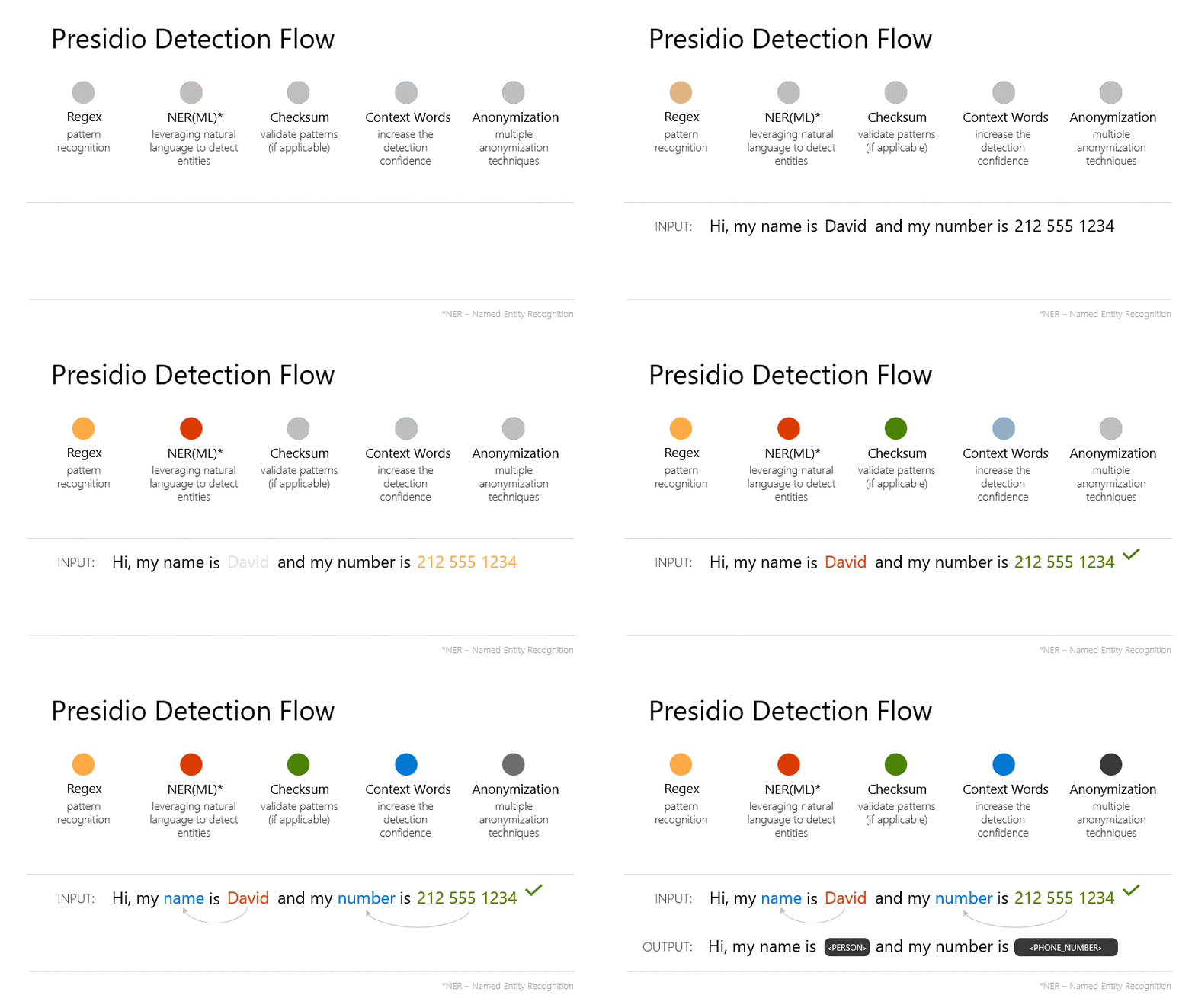
- 개인식별정보(PII) 탐지 및 익명화: 이름, 이메일 주소, 신용카드 번호, 전화번호, 위치, 비트코인 지갑 주소, 사용자 정의 PII 등 광범위한 PII 유형을 탐지하고 비식별화합니다
- PII 식별 및 익명화의 사용자 정의 가능성.
- 유연하고 확장 가능: 정규 표현식(Regex), 개체명 인식(NER) 모델, 문맥 인식 등을 결합하여 PII를 감지합니다. 외부 PII 탐지 모델(예: Azure AI Language)을 연결하여 사용할 수도 있습니다.
- 다양한 사용 환경: Python 라이브러리 형태로 가장 많이 사용되며, Docker나 Kubernetes를 통해 HTTP 서비스 형태로 배포하여 다른 언어/프레임워크에서도 접근 가능합니다.
주요 기능
- 명명된 엔터티 인식, 정규식, 규칙 기반 논리 및 여러 언어의 관련 컨텍스트와 함께 체크섬을 활용하는 사전 정의 또는 사용자 지정 PII 인식기입니다.
- 외부 PII 감지 모델에 연결하기 위한 옵션입니다.
- Python 또는 PySpark 워크로드에서 Docker, Kubernetes에 이르기까지 다양한 사용 옵션.
- PII 식별 및 익명화의 사용자 정의 가능성.
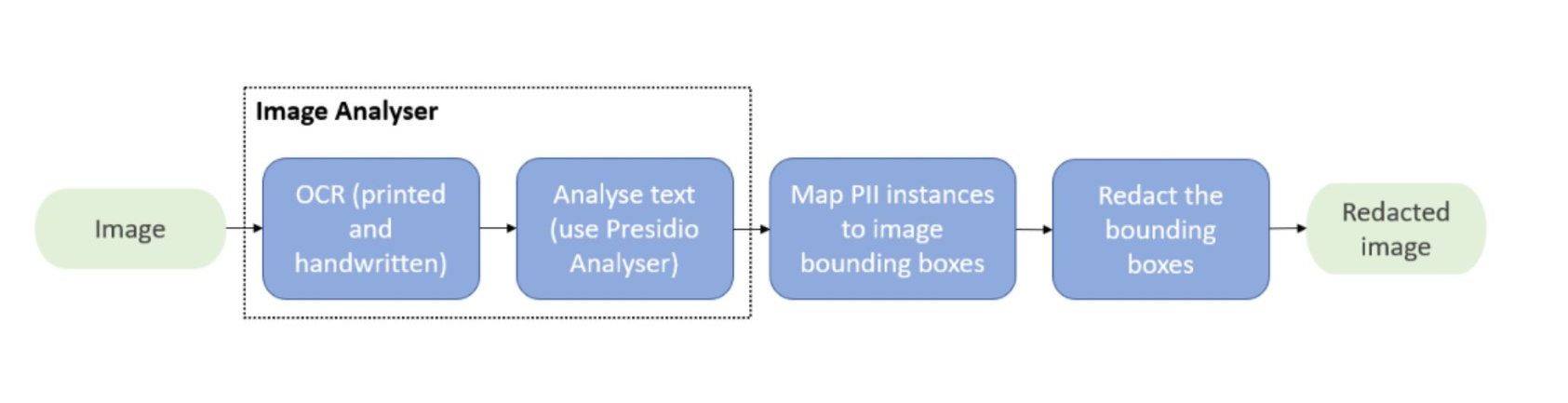
- 이미지의 PII 텍스트를 수정하기 위한 모듈입니다.
Presidio의 모듈
- Presidio 분석기: 텍스트로 PII 식별
- Presidio 익명화기: 다른 연산자를 사용하여 감지된 PII 엔터티를 비식별화합니다.
- Presidio 이미지 수정기: OCR 및 PII 식별을 사용하여 이미지에서 PII 엔터티 수정
- Presidio 구조화: 정형화/반정형 데이터의 PII 식별
| 구성 요소 | 역할 | 기능 |
| Presidio Analyzer (분석기) |
텍스트 내에서 PII 엔터티를 식별합니다. | 탐지된 엔터티 유형과 텍스트 내 위치(인덱스)를 반환합니다. |
| Presidio Anonymizer (익명화 도구) | Analyzer가 탐지한 PII를 비식별화합니다. | 수정(Redact), 마스킹(Mask), 해싱(Hash), 암호화(Encrypt) 등 다양한 익명화 기법을 적용합니다. |
| Presidio Image Redactor | 이미지의 PII 검출 | 이미지의 PII 텍스트를 수정하기 위한 모듈 |
| Presidio structured | 정형화/반정형 데이터의 PII 식별 |
Presidio 실행
- 코드를 통해 Presidio를 실행하기 위한 샘플
- Presidio를 HTTP 서비스로 실행
- 개발 환경 설정
- presidio-analyzer를 사용하여 PII 식별 수행
- presidio-anonymizer를 사용하여 PII 비식별화 수행
- presidio-image-redactor를 사용하여 이미지에서 PII 식별 및 수정 수행
- 배포 예제
[기본예제]
https://microsoft.github.io/presidio/samples/
presidio/docs/samples/python/presidio_notebook.ipynb at main · microsoft/presidio
[예제] presidio_notebook.ipynb
# download presidio
!pip install presidio_analyzer presidio_anonymizer
!python -m spacy download en_core_web_lg
from presidio_analyzer import AnalyzerEngine, PatternRecognizer
from presidio_anonymizer import AnonymizerEngine
from presidio_anonymizer.entities import OperatorConfig
import json
from pprint import pprint
Analyze Text for PII Entities
Using Presidio Analyzer, analyze a text to identify PII entities. The Presidio analyzer is using pre-defined entity recognizers, and offers the option to create custom recognizers.
The following code sample will:
- Set up the Analyzer engine: load the NLP module (spaCy model by default) and other PII recognizers
- Call analyzer to get analyzed results for "PHONE_NUMBER" entity type
text_to_anonymize = "His name is Mr. Jones and his phone number is 212-555-5555"
analyzer = AnalyzerEngine()
analyzer_results = analyzer.analyze(text=text_to_anonymize, entities=["PHONE_NUMBER"], language='en')

print(analyzer_results)
Create Custom PII Entity Recognizers
Presidio Analyzer comes with a pre-defined set of entity recognizers. It also allows adding new recognizers without changing the analyzer base code, by creating custom recognizers. In the following example, we will create two new recognizers of type PatternRecognizer to identify titles and pronouns in the analyzed text. A PatternRecognizer is a PII entity recognizer which uses regular expressions or deny-lists.
The following code sample will:
- Create custom recognizers
- Add the new custom recognizers to the analyzer
- Call analyzer to get results from the new recognizers
titles_recognizer = PatternRecognizer(supported_entity="TITLE",
                                      deny_list=["Mr.","Mrs.","Miss"])

pronoun_recognizer = PatternRecognizer(supported_entity="PRONOUN",
                                       deny_list=["he", "He", "his", "His", "she", "She", "hers", "Hers"])

analyzer.registry.add_recognizer(titles_recognizer)
analyzer.registry.add_recognizer(pronoun_recognizer)

analyzer_results = analyzer.analyze(text=text_to_anonymize,
                            entities=["TITLE", "PRONOUN"],
                            language="en")
print(analyzer_results)
Call Presidio Analyzer and get analyzed results with all the configured recognizers - default and new custom recognizers
analyzer_results = analyzer.analyze(text=text_to_anonymize, language='en')

analyzer_results
Anonymize Text with Identified PII Entities
Presidio Anonymizer iterates over the Presidio Analyzer result, and provides anonymization capabilities for the identified text.
The anonymizer provides 5 types of anonymizers - replace, redact, mask, hash and encrypt. The default is replace
The following code sample will:
- Setup the anonymizer engine
- Create an anonymizer request - text to anonymize, list of anonymizers to apply and the results from the analyzer request
- Anonymize the text
anonymizer = AnonymizerEngine()

anonymized_results = anonymizer.anonymize(
    text=text_to_anonymize,
    analyzer_results=analyzer_results,
    operators={"DEFAULT": OperatorConfig("replace", {"new_value": "<ANONYMIZED>"}),
                        "PHONE_NUMBER": OperatorConfig("mask", {"type": "mask", "masking_char" : "*", "chars_to_mask" : 12, "from_end" : True}),
                        "TITLE": OperatorConfig("redact", {})}
)

print(f"text: {anonymized_results.text}")
print("detailed response:")

pprint(json.loads(anonymized_results.to_json()))
참고자료
https://microsoft.github.io/presidio/
'BigData' 카테고리의 다른 글
| Large DB (데이터베이스)의 Sort-Merge Join (0) | 2025.11.16 |
|---|---|
| YugabyteDB를 이용한 Claude Desktop MCP 서버 설치 (0) | 2025.10.14 |
| 분산DB-YugabyteDB - 클라우드 네이티브 분산 SQL 데이터베이스 설치 가이드 (1) | 2025.10.14 |
| 예시로 보는 *PyTorch 기반의 "DDPM(Denoising Diffusion Probabilistic Model)"* - 이미지생성모델 (2) | 2025.08.29 |
| 인공지능 모델 연구 - Diffusion 합성데이터 기술의 부각 (1) | 2025.08.29 |
| (합성데이터) 텍스트 기반 생성 모델의 종류와 발전 (1) | 2025.08.24 |
| 동영상 합성 데이터 기술의 발전과 생성 모델의 특징 (0) | 2025.08.22 |